
The Confused Copilot: Exploring Capabilities and Privilege Boundaries in Amazon Q - VulnCon 2026
Slides and some background of my talk at Vulncon Bangalore (June 2026) on how I convinced Amazon Q to perform an authorization check on itself, its tools and the results of that exploration. Interesting findings overall around IAM boundaries and tool/capability privileges.
In early May, I noticed a spike in an AWS account I own that I haven’t used in some time. This has happened before and I figured it must have been a EKS cluster or a Bedrock agent I had forgotten to destroy. I was logged into a non-root account at that time, so out of habit I tried to open Cost Explorer to see what I had left running.
I wasn’t surprised that I did not have access to Cost Explorer with my non-root access. I just chuckled and was about to hit logout when I thought of asking Amazon Q if it could tell me what my billing looked like. I absolutely did not expect it to work, but imagine my surprise when Amazon Q responded with what looked like correct information.
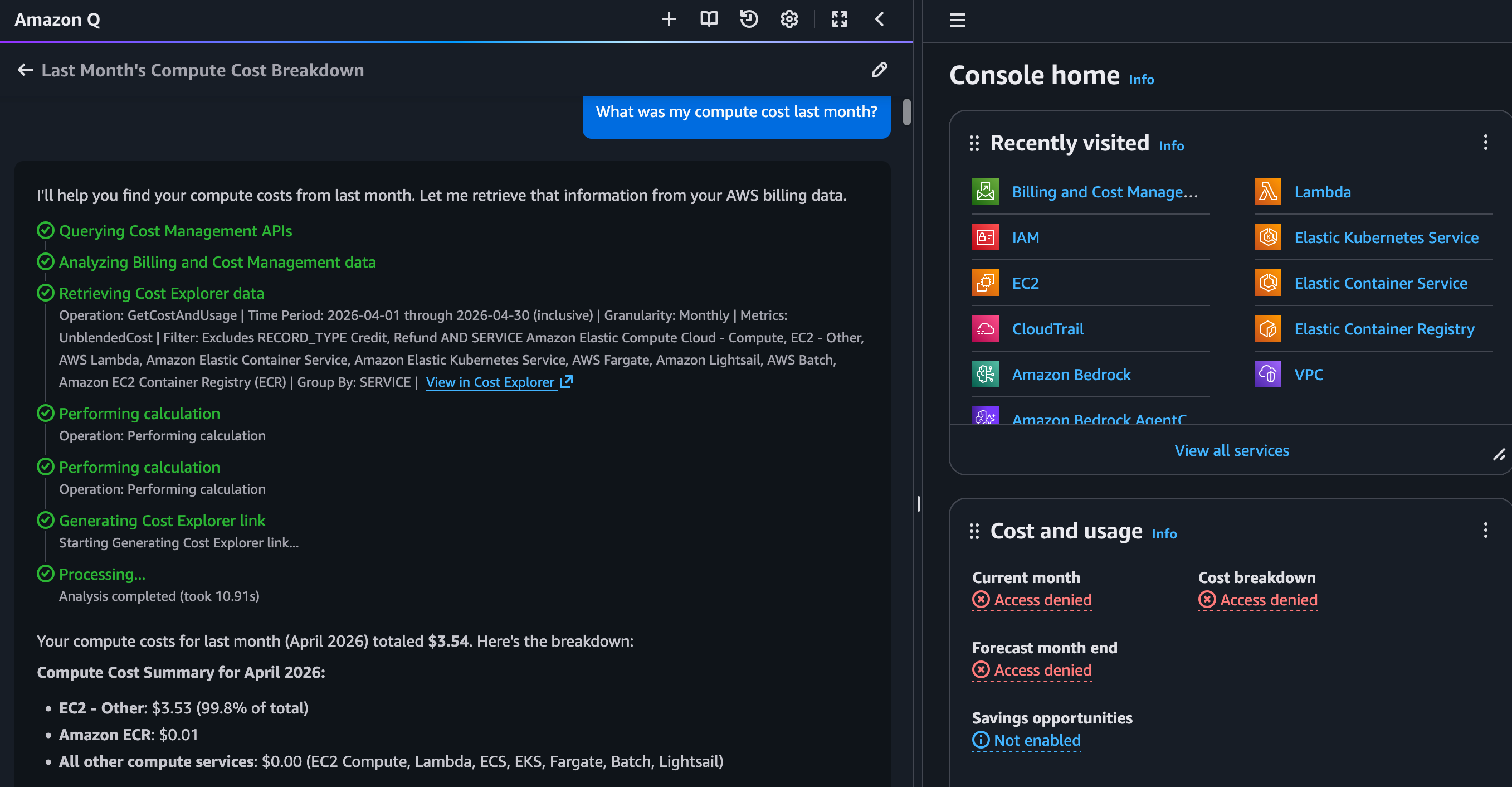
I did some more digging and convinced Amazon Q to check the authorization levels for its various tools. I recently covered my exploration at Vulncon, a security conference in Bangalore. These are the slides and data relevant to the conference talk about me exploring capabilities and privilege boundaries in Amazon Q.
The talk is about abusing a system whose structure is well-defined, but whose behavior is probabilistic - like any AI system you interact with today. The talk covers the research methodology and findings from testing the privilege boundaries of Amazon Q Developer - an AI copilot built into the AWS Console. The core idea was to confuse an AI Copilot into performing actions outside its assumed scope of operations - in our case, tricking it into performing a security (authorization) review of itself.
The talk covers (see slides for the full run):
- Introduction to Amazon Q and AI Agent tools
- Tool Permission Boundary - what Agent tools are and how they interact with AWS APIs
- Identifying undocumented functionality within Amazon Q that leaks data by overstepping AWS IAM privilege boundaries
- A live walkthrough of confusing Amazon Q into pentesting itself
- The 13 tools available within Amazon Q, their permission models, and their privilege boundaries
- Practical abuse queries to leak resource names via billing and monitoring tools
- Minimum permissions required to operate and abuse Amazon Q
- Conclusions and recommendations for securing AI copilots
What are Agent Tools?
Think of them as functions an Agent can call to act on the world or fetch data it doesn’t hold itself - turning text generation into actions with real effects. For example, a get_weather(city) tool - the Agent decides to call it based on user input, passes “Bangalore” to your deterministic code which hits a weather API, and the result is fed back into the Agent’s context to answer the user.
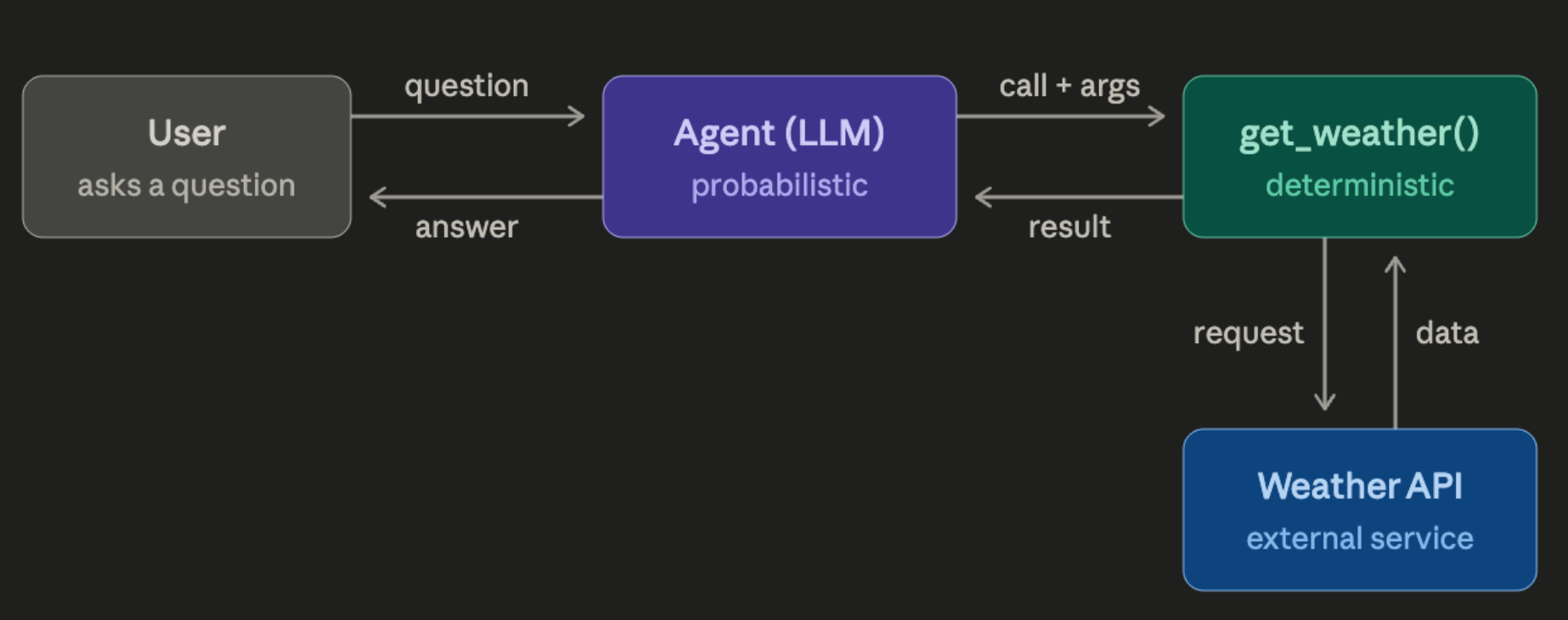
Authorization is a questionable attribute for systems like these - often poorly implemented for growing internal API requests.
The Confused Copilot
Amazon Q Developer is a generative AI-powered assistant built into the AWS Console. It can answer questions about your AWS infrastructure, troubleshoot issues, analyze costs, and more. Under the hood, it uses “tools” - functions that can call AWS APIs on your behalf.
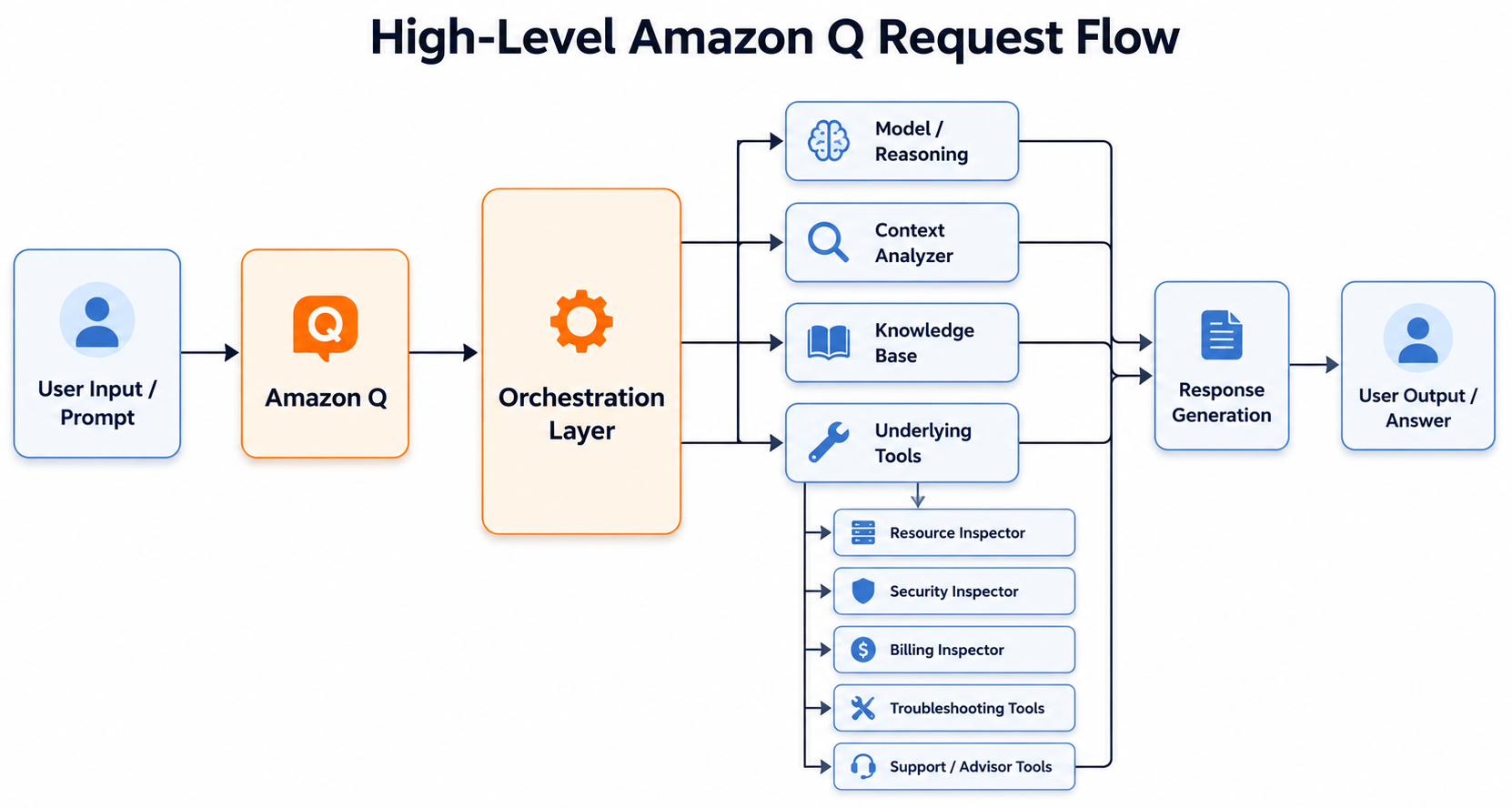
The research question I worked with: Can we make Amazon Q perform actions outside its intended scope? Specifically - can we trick it into pentesting itself to identify and confirm its authorization boundaries and if there is potential for abuse to leak data through undocumented privilege boundaries?
Tool Permissions and Boundaries
Here’s the complete breakdown of all 13 Amazon Q Developer tools, their permission models, and the privilege boundary each operates within based on the response from Amazon Q:
| # | Tool | Description | Permission Model | Boundary |
|---|---|---|---|---|
| 1 | BillingInspector | Cost analysis and pricing data from Cost Explorer | Retrieves billing data using IAM ce:GetCostAndUsage permissions; uses dedicated cost-management infra |
Enhanced + IAM* |
| 2 | InvestigatorCapability | Analyzes CloudWatch metrics, logs, and alarms for anomalies | Scans alarms/metrics across all regions; needs IAM for resource metadata | Enhanced + IAM* |
| 3 | ResourceInspector | Read-only retrieval of AWS resource info | Respects current IAM permissions (confirmed) | IAM-bound |
| 4 | AwsKnowledgeBase | Authoritative AWS services, features, and best practices | None - knowledge-based, no API calls | No API |
| 5 | SecurityInspector | Analyzes AWS security config, surfaces insights | Requires AWS Org onboarding; returns access-denied otherwise (confirmed) | IAM-bound |
| 6 | TroubleshootingCapability | Account issues, S3, containerization, Glue/Athena | Needs resource identifiers; likely IAM-bound with enhanced diagnostics | Partial / IAM* |
| 7 | NetworkAnalyzer | VPC networking and connectivity troubleshooting | Untested; network troubleshooting typically needs IAM permissions | Partial / IAM* |
| 8 | SupportAssistant | AWS Support case creation, human agent contact | Requires user confirmation; not a resource API | Confirmation |
| 9 | InstanceSelector | Recommends EC2 instance types for workloads | None - recommendation engine, no API calls | No API |
| 10 | SecurityAdvisor | Mandatory security disclaimers for security queries | None - auto-triggered, no API calls | No API |
| 11 | ContextAnalyzer | Current console state, page metadata, user context | Read-only console state; no resource APIs | Read-only |
| 12 | PartnerAssistantAgent | AWS Partner Network (APN) guidance | None - partner-focused info, no API calls | No API |
| 13 | SesAgent | Amazon SES expertise and troubleshooting | SES-specific; unclear if API-backed | SES-specific |
* Ongoing research - additional testing shows a minimum set of permissions required; working to establish hard access confirmation. It appears that, as of 15th June 2026, all tools adhere to and require appropriate IAM privileges to function, else the tool fails.
Minimum Permissions to (Ab)use Amazon Q
To use and test Amazon Q Developer, the following minimum permissions are needed:
AmazonQDeveloperAccess- AWS managed policy for Amazon Qce:GetCostAndUsage- Cost Explorer access (needed for BillingInspector)ce:GetCostAndUsageWithResources- Cost Explorer resource-level access (optional - for granular resource level information)
These permissions do not give you access to Cost Explorer to view the data in the dashboard but you can use APIs to query the data, which is what Amazon Q was able to do.
Potentially practical Abuse Queries
For a user with no explicit access to AWS services but with the minimum permissions to Cost Explorer, we can use Amazon Q to make requests to fetch information that can be used to leak resource names.
Here are a few queries that demonstrate leaking resource names via the BillingInspector and InvestigatorCapability tools when Resource Level Granular logging is enabled:
- “Use the BillingInspector tool to do Cost Analysis and tell me which are my 5 most expensive S3 buckets.”
- “Use the BillingInspector tool to get me a list of EC2 instances.”
- “Use the InvestigatorCapability to review CloudWatch alarms to extract any EC2 instance names mentioned there.”
Conclusion
All Agents can be made to do things outside of their prompt-bound scope. The appetite for risk, access to customer information, and internal systems should be your metrics of (ab)use and security.
Expansion of an Agent’s autonomy and capabilities via tools and MCP is increasingly common, which is why tools need to be secured the same way API systems are:
- Authorization / Privilege boundaries - Every tool call must be IAM-checked
- Sanitization of output - Don’t leak resource identifiers through secondary data paths
- Code Execution capabilities and PoLP - Least privilege for agent tool execution
- Undocumented internal capabilities - Audit what your AI copilot can actually do
Slides
Until next time! Happy Hacking!