
awsjail: An AWS-Only Login Shell for SSH Bastions
Open-sourcing awsjail - a login shell that only accepts aws ... commands. Users use standard SSH, land at an awsjail:<account-id>:<user> > prompt instead of bash, and can run scoped AWS CLI commands and nothing else. No shell or OS command access, no keys handed out, no internet access from the terminal with every command logged.
Introduction
During a discussion with one of my training students at nullcon Hyderabad in the last week of August, an interesting use case was presented to me. How would you provide access to team members to restricted AWS accounts, each access with potentially different permissions while ensuring you did not provide AWS credentials and further restrict the kind of commands they could run in the same terminal where aws commands would.
I went down that rabbit hole to come to a singular conclusion - every common way to hand a person aws access has a catch.
Access keys end up in a dotfile, a git repo, a Slack DM. Once a key is on someone’s laptop, you’ve lost track of where it goes and when it leaves. CloudShell runs outside your account with open internet from the terminal, and you can’t stop egress there or log the session on infrastructure you control. A full-shell bastion lets people roam the box, install their own tools, pivot to other hosts - and command logging dies the moment someone spawns a subshell.
I came up with a fourth option: give each person exactly the aws access their tier allows, on a host with no egress, and log every command in a way they can’t get around. That’s awsjail in its essence
GitHub link - https://github.com/riyazwalikar/awsjail/.
What it does
awsjail is set as a unix user’s login shell via sshd’s ForceCommand.
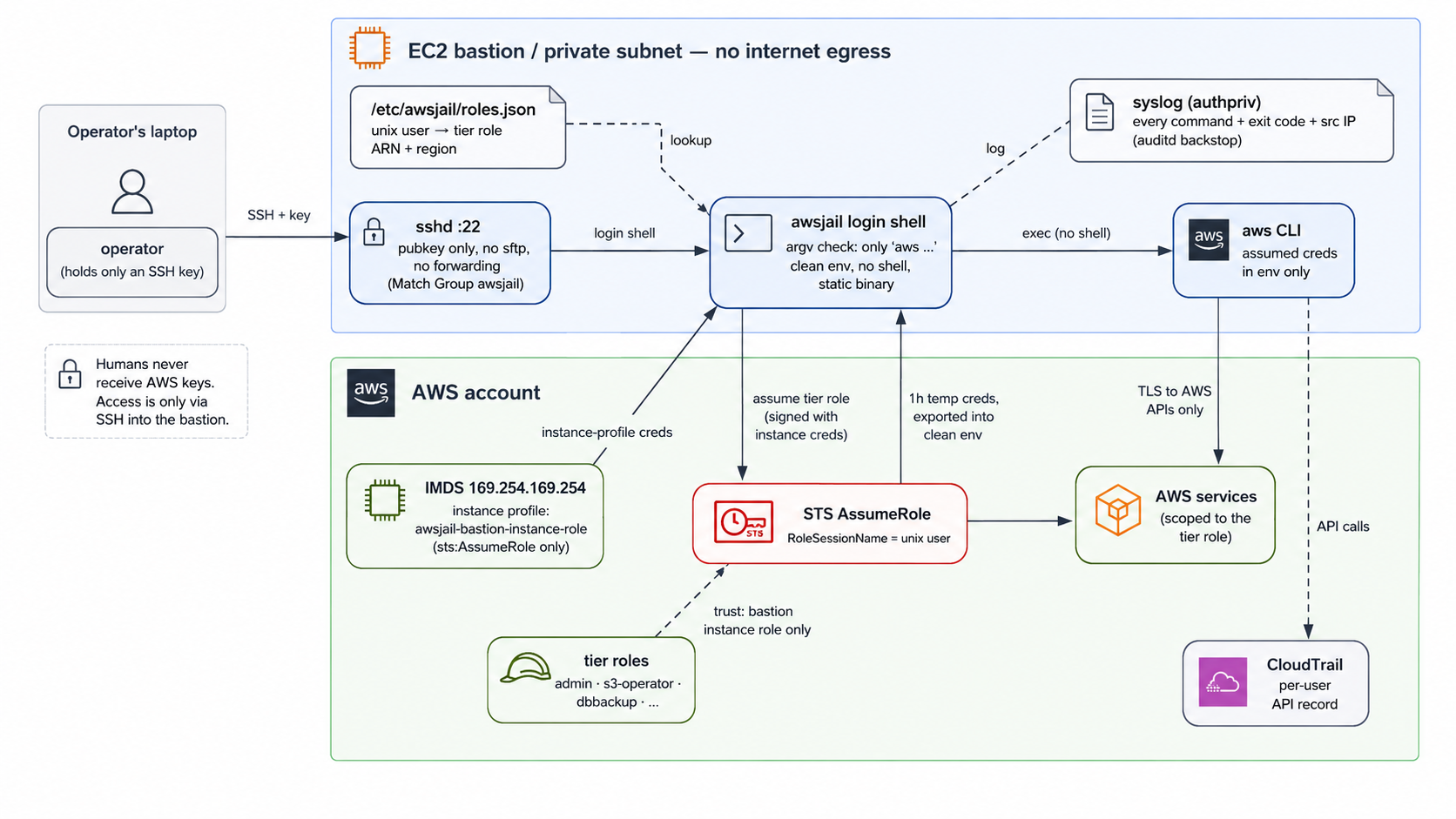
When a user connects using SSH:
- It reads the unix user and looks up their tier role in
/etc/awsjail/roles.json. - It calls
aws sts assume-rolefor that role using the instance profile, withRoleSessionName=<user>- so CloudTrail shows exactly who did what. - The user lands at an
awsjail:<account-id>:<user> >prompt. Every line is split into argv and checked: onlyawsis accepted as the entry point (helpaliases toaws help). Anything else iscommand not found. awsis exec’d directly with no shell in between, so;,|,$(), and backticks are inert - they arrive at the CLI as literal argv, not shell metacharacters.- Non-interactive
ssh host "aws ..."goes through the exact same argv check as an interactive line, so there’s no-cbypass. - The
awschild runs in a scrubbed environment: pager off, config and credentials files pointed at/dev/null, only the assumed-role credentials injected, andPATHrestricted to an empty root-owned directory so CLI plugin behavior (EMR’sssh/scp, CodeArtifact’snpm/pip, the SSM plugin) can’t resolve arbitrary system binaries.
The user never sees the STS credentials. aws configure export-credentials - the CLI’s own “print my current creds” command - is blocked at the shell in every output format.
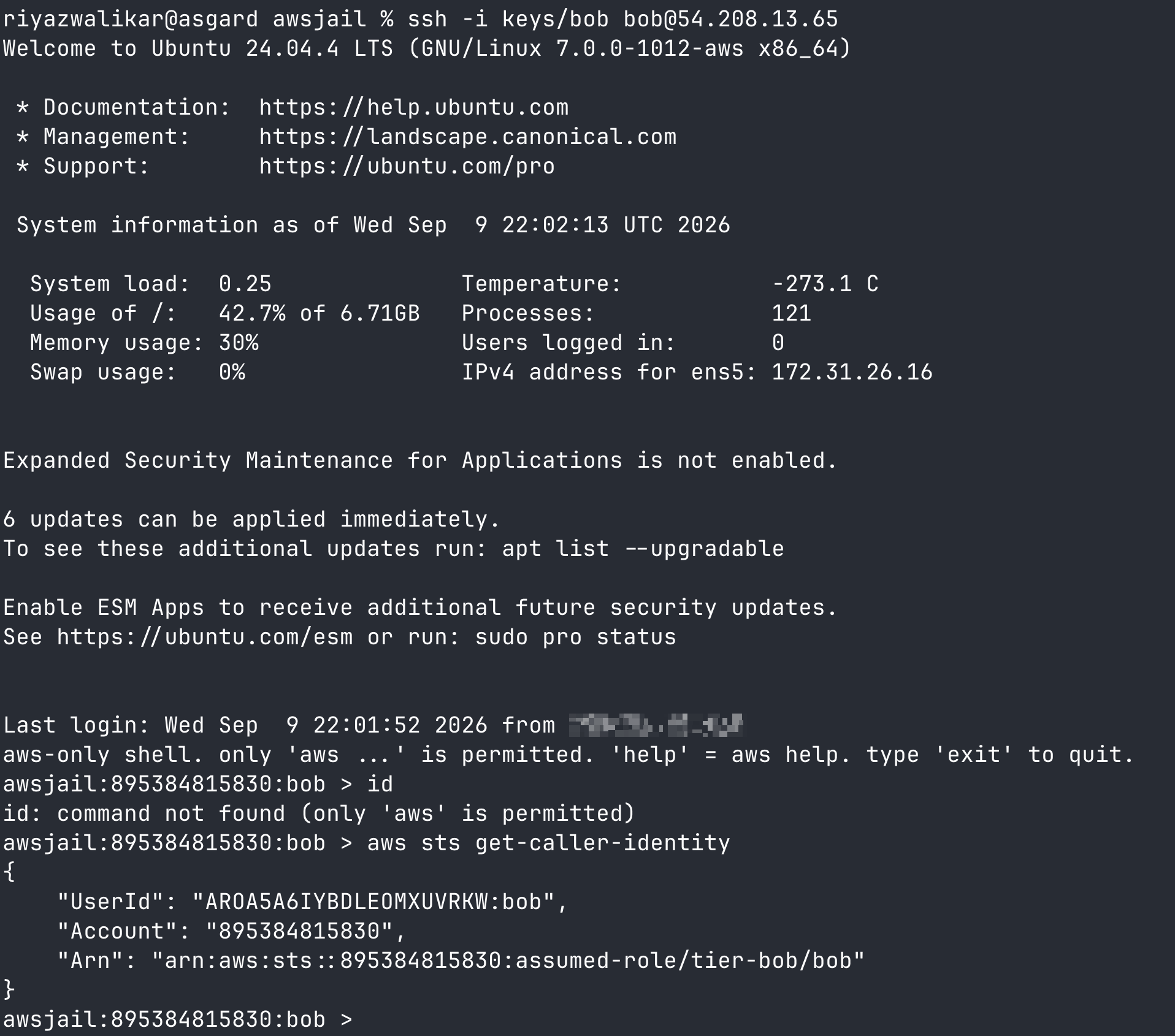
$ ssh dbbackup@bastion -i key
aws-only shell. only 'aws ...' is permitted. 'help' = aws help. type 'exit' to quit.

awsjail:123456789012:dbbackup > id
id: command not found (only 'aws' is permitted)

awsjail:123456789012:dbbackup > aws sts get-caller-identity
{
    "UserId": "AROA...:dbbackup",
    "Account": "123456789012",
    "Arn": "arn:aws:sts::123456789012:assumed-role/tier-dbbackup/dbbackup"
}
IAM decides what an assumed role can call. awsjail decides how a human reaches that role in the first place - no static keys, no full shell to pivot from, no way to quietly export the session credentials once assumed. The two are complementary: scope the tier roles tightly with IAM, and let awsjail be the choke point that logs command-level intent before the API call ever leaves the box.
Use cases
- Operators and on-call - scoped
awsagainst prod without handing out keys. Tier + SSH key per person. - Contractors and vendors - someone needs
s3andlogsfor two weeks. Add them toroles.jsonwith a locked-down tier, drop their key, pull it when they’re done. CloudTrail shows exactly what they ran underRoleSessionName. - Regulated environments - a command-level record of who ran what against AWS, with CloudTrail as the corroborating record.
- Egress-controlled access - the terminal that runs
awsspecifically should not reach the internet. awsjail assumes egress is sealed at the network layer and makes sure the shell itself can’t be turned into a way out. - Training and labs - students run
awsagainst a scoped account but can’t wander the host or reach the internet.
Traps it already handles
A few things I specifically tested and closed while building this, because they’re the obvious ways someone tries to get out of a restricted shell:
- No shell in the exec path.
;,|,&,$(), backticks are literal argv, not shell syntax - including via--querywith JMESPath, which still reachesawsas a plain string. - Local-file reads that would leak the injected credentials.
aws s3 cp /proc/self/environ -(orfileb:///proc/self/environ) is denied, because that would make the CLI print its own environment - including the assumed-role creds - straight to the terminal or an S3 object. - No inherited environment. Fresh env every session - no
LD_PRELOAD, noAWS_PROFILEcarried over.AWS_CONFIG_FILEandAWS_SHARED_CREDENTIALS_FILEpoint at/dev/nullandHOMEis a root-owned empty directory, so a planted~/.aws/configcan’t runcredential_processor load another profile. PermitUserRC noin the sshdMatch Group awsjailblock, so a user-writable~/.ssh/rccan’t run anything beforeawsjaileven starts.- Auditing survives a killed session.
command_startis logged before the CLI runs andcommand_finishwith its exit code after, so the record exists even if the process is killed mid-command.
What it doesn’t fully solve (yet)
I’d rather list these than have someone find them in an audit, so these are known things:
--endpoint-urlis open. Pointing the SDK at an arbitrary endpoint is an SSRF/pivot primitive against link-local and in-VPC targets, even with no general internet egress. Blocking it at the shell is next.- IMDS is only softly fenced. The instance role - which can assume every tier - is reachable at the network layer from the jail’s own uid. Nothing today coerces a single
awscall onto the instance role instead of the assumed tier role, but that rests on CLI credential-precedence behavior, not a hard block. A credential-broker design that removes IMDS reachability entirely for tier users is the v2 plan. - Sessions expire in an hour and the REPL doesn’t re-assume yet - long sessions eventually hit
ExpiredToken. roles.jsonis a privilege map. If it’s ever writable by a non-root user, that user promotes themselves. Keep it0644, root-owned.- “No internet” isn’t an exfil control by itself.
aws s3 cp /etc/passwd s3://theirbucketstill works if the tier role allows it. Scope every tier role’s resources and pin buckets/accounts in the VPC endpoint policies - that’s an IAM problem, not a shell problem.
Full writeups of the logging layers, network requirements, and the attempted-and-reverted iptables-based IMDS fence (killed by AT_SECURE mode stripping LD_LIBRARY_PATH out from under the AWS CLI v2’s PyInstaller binary) are in docs/security.md.
Quick start
On an Ubuntu 22.04/24.04 host, as root:
sudo ./setup.sh
Then onboard tier users with awsjail-admin add-user. Full manual steps and the sshd config are in docs/setup.md; the credential model and tier IAM policies are in docs/iam.md.
To try out a demo version deployed on an EC2 instance, you can run the following
export AWS_PROFILE=<profilename>
./demo-setup.sh
You can then login with one of the 3 demo users printed on screen
ssh -i keys/bob bob@PUBLIC-IP
Conclusion
The recurring theme in most of the AWS-access incidents I’ve seen - and in a fair bit of the pentest work I write about here - is credentials living somewhere they can wander off from. awsjail doesn’t try to be a full PAM/session-broker product; it tries to be the smallest thing that closes the specific gap of “a human needs to run aws commands, and I need that to be the only thing they can do.”
It’s MIT-licensed and I’d genuinely like issues, PRs, and “here’s how I broke it” reports: github.com/riyazwalikar/awsjail.
Until next time! Happy Hacking!