Claude Code with Any Model: A Shell Switcher for DeepSeek, Ollama, Kimi, and Anthropic
My take on using different models for different projects via Claude Code with some simple shell scripting and API Keys. Not as elegant as a model router but works very well for everyday tasks.
The Problem
If you just want the shell script, scroll right down.
I use several coding agents and platforms depending on the kind of work I’m doing. I switch between Cursor and Claude Code for most of my dev work, content generation and troubleshooting. Both clients work great when using a single model family but when you are token conscious you will want to switch between model families frequently that belong to different providers.
Claude Code, specifically, ships with Anthropic’s models - Opus, Sonnet, Haiku - and you pay Anthropic for them. Opus for architecture, Sonnet for implementation, Haiku for quick edits.
But Anthropic isn’t always the right answer. Sometimes you want a different model but the comfort of using Claude Code for its usability. For example:
- DeepSeek V4 Pro - 1M token context, strong reasoning, cheaper than Opus at scale. My default most days.
- A local model via Ollama - zero network cost, no API keys, air-gapped work
- GLM-5.2 via Ollama cloud - a different architecture with different strengths and quite recently having been compared to Opus 4.6 for coding, a fair competitor in the field
- Kimi K3 - 1M context, Moonshot’s flagship. Different architecture, strong at long-context reasoning and a solid second opinion for code review.
You could set up LiteLLM, OpenRouter, or some proxy to auto-route based on task type. But that’s heavy - another service to run, another config file to manage and backup, another thing that could break or need an update.
For the kind of work I do, a model router is overkill.
The Idea
Four shell functions. Each one sets the right environment variables and launches claude. That’s it. No proxy. No middleware. No config file. Just:
cc              # Anthropic (default)
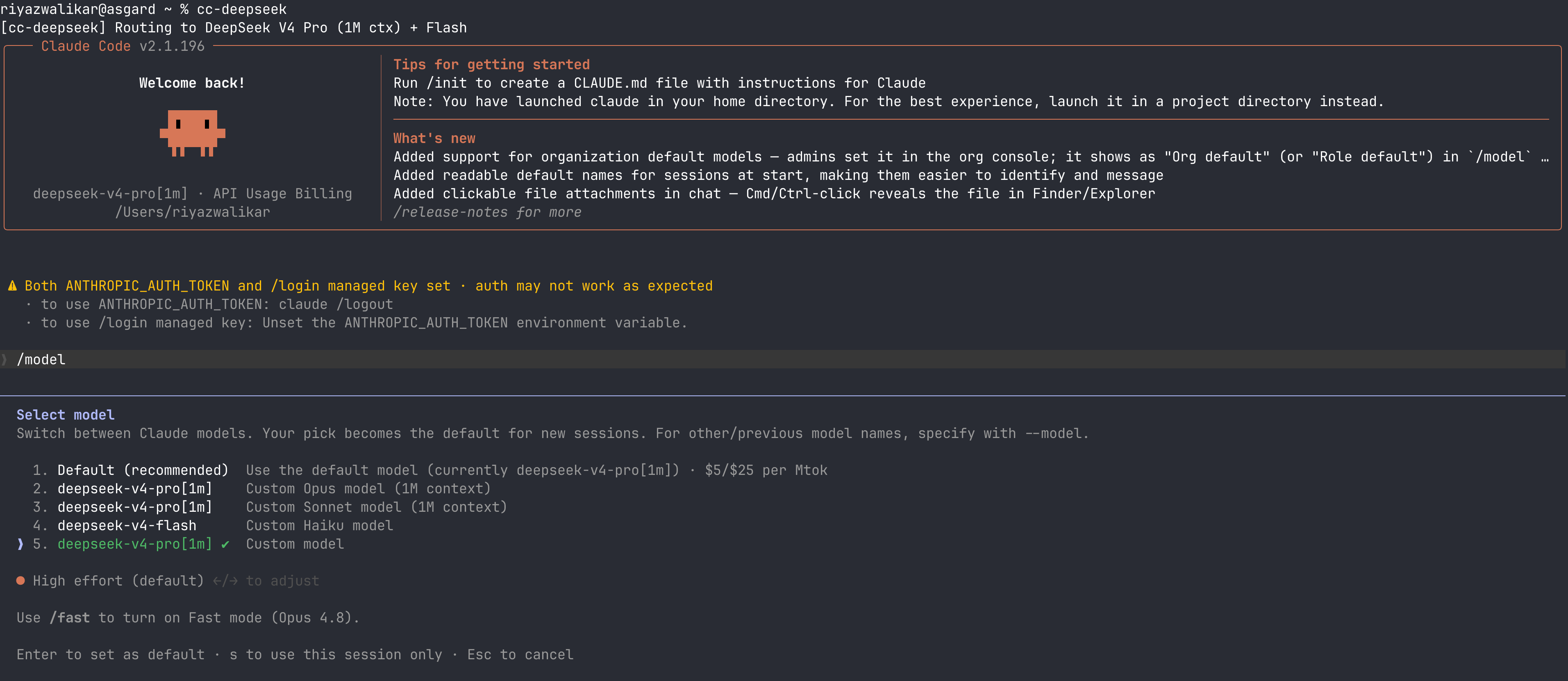
cc-deepseek     # DeepSeek V4 Pro + Flash
cc-ollama       # Ollama local or cloud
cc-kimi         # Kimi K3 / K2.7 Code
All four pass through extra args, so --resume, --model, --verbose, etc. work as expected:
cc-deepseek --resume
cc-ollama --model glm-5.2:cloud
cc-kimi --resume
cc --verbose
How It Works
Claude Code reads these environment variables before starting:
| Variable | Purpose |
|---|---|
ANTHROPIC_BASE_URL |
Messages API endpoint |
ANTHROPIC_AUTH_TOKEN / ANTHROPIC_API_KEY |
Auth token |
ANTHROPIC_MODEL |
Default model |
ANTHROPIC_DEFAULT_OPUS_MODEL |
Model for Opus-tier tasks |
ANTHROPIC_DEFAULT_SONNET_MODEL |
Model for Sonnet-tier tasks |
ANTHROPIC_DEFAULT_HAIKU_MODEL |
Model for Haiku-tier tasks |
ANTHROPIC_DEFAULT_FABLE_MODEL |
Model for Fable-tier tasks |
ANTHROPIC_SMALL_FAST_MODEL |
Model for fast/lightweight tasks |
CLAUDE_CODE_SUBAGENT_MODEL |
Model for subagents |
CLAUDE_CODE_DISABLE_NONESSENTIAL_TRAFFIC |
Kill telemetry |
ENABLE_TOOL_SEARCH |
Must be false for Kimi (endpoint doesn’t support it) |
CLAUDE_CODE_AUTO_COMPACT_WINDOW |
Context window trigger (1M for K3, 256K for K2.7) |
CLAUDE_CODE_MAX_CONTEXT_TOKENS |
Max context tokens (set to 1M for K3) |
CLAUDE_CODE_EFFORT_LEVEL |
Reasoning effort — max recommended for Kimi |
CLAUDE_CODE_MAX_OUTPUT_TOKENS |
Max tokens per response |
Set these before launching claude, and it connects to whatever endpoint you specify. No config changes. No proxy. No yak-shaving.
The switcher functions do exactly that: export the right values, then claude "$@".
The DeepSeek One
DeepSeek runs a native Anthropic Messages API endpoint at https://api.deepseek.com/anthropic. No translation layer - it speaks the protocol directly. This matters because tool use, streaming, and system prompts all work exactly as Claude Code expects.
cc-deepseek() {
    export ANTHROPIC_BASE_URL="https://api.deepseek.com/anthropic"
    export ANTHROPIC_AUTH_TOKEN="sk-your-deepseek-api-key"

    export ANTHROPIC_MODEL="deepseek-v4-pro[1m]"
    export ANTHROPIC_DEFAULT_OPUS_MODEL="deepseek-v4-pro[1m]"
    export ANTHROPIC_DEFAULT_SONNET_MODEL="deepseek-v4-pro[1m]"
    export ANTHROPIC_DEFAULT_HAIKU_MODEL="deepseek-v4-flash"
    export CLAUDE_CODE_SUBAGENT_MODEL="deepseek-v4-flash"

    export CLAUDE_CODE_DISABLE_NONESSENTIAL_TRAFFIC=1
    export CLAUDE_CODE_DISABLE_NONSTREAMING_FALLBACK=1
    export CLAUDE_CODE_EFFORT_LEVEL="max"
    export CLAUDE_CODE_MAX_OUTPUT_TOKENS=64000

    echo "[cc-deepseek] Routing to DeepSeek V4 Pro (1M ctx) + Flash"
    claude "$@"
}
Map the heavy model (deepseek-v4-pro[1m]) to Opus and Sonnet tiers, the fast model (deepseek-v4-flash) to Haiku and subagents. 1M context, strong reasoning, costs less than Opus. Good for long sessions where context-crushing matters more than raw code-generation nuance.
Note: deepseek-chat and deepseek-reasoner names are getting killed 2026-07-24. Use the V4 names.
The Ollama One
Ollama v0.14.0+ exposes a native Anthropic Messages API at localhost:11434. No LiteLLM. No proxy. Just point ANTHROPIC_BASE_URL at localhost and go.
cc-ollama() {
    if ! curl -s http://localhost:11434/api/tags > /dev/null 2>&1; then
        echo "Error: Ollama doesn't seem to be running on localhost:11434."
        echo "In another window run: ollama serve"
        return 1
    fi

    local default_model="qwen3.6:latest"

    export ANTHROPIC_BASE_URL="http://localhost:11434"
    export ANTHROPIC_AUTH_TOKEN="ollama"
    export ANTHROPIC_API_KEY=""

    export ANTHROPIC_MODEL="${default_model}"
    export ANTHROPIC_DEFAULT_OPUS_MODEL="glm-5.2:cloud"
    export ANTHROPIC_DEFAULT_SONNET_MODEL="${default_model}"
    export ANTHROPIC_DEFAULT_HAIKU_MODEL="${default_model}"
    export ANTHROPIC_SMALL_FAST_MODEL="${default_model}"

    export CLAUDE_CODE_DISABLE_NONESSENTIAL_TRAFFIC=1

    echo "[cc-ollama] Routing to Ollama at localhost:11434 (default: ${default_model})"
    echo "[cc-ollama] Tip: pass --model glm-5.2:cloud for GLM-5.2 via Ollama cloud"
    claude "$@"
}
Local models for air-gapped work. GLM-5.2 via Ollama cloud for when you want GLM’s architecture. qwen3.6:27b as the daily driver. Pull whichever model you want with ollama pull <model> and pass it with --model.
Update: Ollama v0.15+ ships an official
ollama launch claudecommand that does this env-var setup for you - no export/unset needed:ollama launch claude # pick/prompt a model ollama launch claude --model qwen3.6:latest # local model ollama launch claude --model glm-5.2:cloud # cloud modelIt auto-sets
ANTHROPIC_BASE_URL,ANTHROPIC_AUTH_TOKEN=ollama, andANTHROPIC_API_KEY="", and pulls the model if you don’t have it yet. The catch: it sets oneANTHROPIC_MODELfor the whole session, not per-tier overrides. Mycc-ollamafunction maps Opus-tier calls toglm-5.2:cloudand everything else toqwen3.6-ollama launchdoesn’t do that tiering, so if you want different models for different Claude Code tiers, the manual function below is still the way to go. For simple single-model use,ollama launch claudeis less to maintain.
The Kimi One
Kimi (by Moonshot AI) exposes an Anthropic-compatible Messages API at https://api.moonshot.ai/anthropic. Their K3 model has a 1M token context window and strong long-context reasoning. K2.7 Code is their coding-specialized model, K2.6 is the fast/cheap option.
Note: This is the Kimi Open Platform (developer API at platform.kimi.ai). There’s also the Kimi Code product (kimi.com/code) which uses a different endpoint (api.kimi.com/coding) with different model names. The two are separate — don’t mix base URLs and model names across them. Your API key determines which one you use.
cc-kimi() {
    # Clean slate: unset any third-party provider overrides from previous calls
    unset ANTHROPIC_BASE_URL
    unset ANTHROPIC_MODEL
    unset ANTHROPIC_SMALL_FAST_MODEL
    unset ANTHROPIC_DEFAULT_OPUS_MODEL
    unset ANTHROPIC_DEFAULT_SONNET_MODEL
    unset ANTHROPIC_DEFAULT_HAIKU_MODEL
    unset ANTHROPIC_DEFAULT_FABLE_MODEL
    unset CLAUDE_CODE_SUBAGENT_MODEL
    unset CLAUDE_CODE_DISABLE_NONESSENTIAL_TRAFFIC
    unset CLAUDE_CODE_DISABLE_NONSTREAMING_FALLBACK
    unset CLAUDE_CODE_EFFORT_LEVEL
    unset CLAUDE_CODE_AUTO_COMPACT_WINDOW
    unset CLAUDE_CODE_MAX_CONTEXT_TOKENS
    unset CLAUDE_CODE_MAX_OUTPUT_TOKENS
    unset ANTHROPIC_API_KEY
    unset ANTHROPIC_AUTH_TOKEN
    unset ENABLE_TOOL_SEARCH

    # Resolve API key: KIMI_API_KEY env var, or fall back to hardcoded default
    local api_key="${KIMI_API_KEY:-sk-your-kimi-api-key}"
    if [ -z "${api_key}" ]; then
        echo "[cc-kimi] Error: No API key found."
        echo "[cc-kimi] Set KIMI_API_KEY in your shell profile or edit this function."
        echo "[cc-kimi] Get your key at https://platform.kimi.ai/console/api-keys"
        return 1
    fi

    # Default: K3 with 1M context
    local model="kimi-k3"
    local ctx_window=1048576

    export ANTHROPIC_BASE_URL="https://api.moonshot.ai/anthropic"
    # Platform docs: use ANTHROPIC_AUTH_TOKEN, do NOT set ANTHROPIC_API_KEY
    # (having both set causes 401 auth conflicts)
    export ANTHROPIC_AUTH_TOKEN="${api_key}"

    export ANTHROPIC_MODEL="${model}"
    export ANTHROPIC_SMALL_FAST_MODEL="${model}"
    export ANTHROPIC_DEFAULT_FABLE_MODEL="${model}"
    export ANTHROPIC_DEFAULT_OPUS_MODEL="${model}"
    export ANTHROPIC_DEFAULT_SONNET_MODEL="${model}"
    export ANTHROPIC_DEFAULT_HAIKU_MODEL="${model}"
    export CLAUDE_CODE_SUBAGENT_MODEL="${model}"

    export CLAUDE_CODE_EFFORT_LEVEL="max"
    export CLAUDE_CODE_AUTO_COMPACT_WINDOW="${ctx_window}"
    export CLAUDE_CODE_MAX_CONTEXT_TOKENS="${ctx_window}"
    export CLAUDE_CODE_MAX_OUTPUT_TOKENS=64000

    # Kimi does not support tool search yet — must be false
    export ENABLE_TOOL_SEARCH=false

    # No telemetry or update checks hitting Anthropic's servers
    export CLAUDE_CODE_DISABLE_NONESSENTIAL_TRAFFIC=1

    echo "[cc-kimi] Routing to Kimi Open Platform (model: ${model}, ctx: ${ctx_window})"
    echo "[cc-kimi] Also available: kimi-k2.7-code (256K), kimi-k2.6 (simple tasks)"
    echo "[cc-kimi] Verify with /status — Base URL should show https://api.moonshot.ai/anthropic"
    claude "$@"
}
Model Tiers and Plans
Kimi Open Platform has plan-gated model access:
| Plan | Models Available | Context |
|---|---|---|
| Andante / Moderato | kimi-k2.7-code (K2.7 Code), kimi-k2.6 |
256K |
| Allegretto+ | kimi-k3 (K3, 1M), kimi-k2.7-code (fast variant) |
1M / 256K |
Thinking Behavior
This is where Kimi differs from other providers. Thinking is model-specific and non-negotiable:
| Model | Thinking | Notes |
|---|---|---|
kimi-k3 |
On by default | Works out of the box |
kimi-k2.7-code |
Always required | Press Option+T (Mac) / Alt+T (Win/Linux) to toggle Thinking on. Without it: 400 invalid thinking: only type=enabled is allowed |
kimi-k2.6 |
Optional | Can run with thinking off; good for latency-sensitive tasks |
Important: disabling thinking on K3 or K2.7 Code routes them down to K2.6. Keep it on. Toggle thinking in-session with Option+T (macOS) or Alt+T (Windows/Linux).
Thinking Effort Mapping
Claude Code effort levels map to Kimi as follows:
| Claude Code Effort | Kimi Behavior |
|---|---|
low / medium / high |
→ high |
xhigh / max |
→ max |
Tool Limitations
Two things to know:
- WebSearch (
ENABLE_TOOL_SEARCH) must be set tofalse. The Kimi Open Platform endpoint doesn’t support Claude Code’s native tool search yet. Without this,--dangerously-bypass-approvalsor certain auto-workflows may fail. - WebFetch is also unsupported. Workaround: paste page content directly or use an MCP scraping tool like the built-in Playwright MCP.
Auth Note
The Kimi Open Platform docs say to use ANTHROPIC_AUTH_TOKEN and not set ANTHROPIC_API_KEY. Having both set causes 401 auth conflicts. The updated function only exports ANTHROPIC_AUTH_TOKEN.
Verification
After launching cc-kimi, run /status. The Base URL should show https://api.moonshot.ai/anthropic and the model should show kimi-k3. Note: the /model menu won’t list Kimi models — it’s a hardcoded list of Anthropic aliases. Send any message to confirm a normal reply.
Docs: https://platform.kimi.ai/docs/guide/claude-code-kimi
The Anthropic One (Default)
The cc function is the reset - it unsets all the third-party overrides and uses your standard Anthropic subscription:
cc() {
    unset ANTHROPIC_BASE_URL
    unset ANTHROPIC_MODEL
    unset ANTHROPIC_SMALL_FAST_MODEL
    unset ANTHROPIC_DEFAULT_OPUS_MODEL
    unset ANTHROPIC_DEFAULT_SONNET_MODEL
    unset ANTHROPIC_DEFAULT_HAIKU_MODEL
    unset ANTHROPIC_DEFAULT_FABLE_MODEL
    unset CLAUDE_CODE_SUBAGENT_MODEL
    unset CLAUDE_CODE_DISABLE_NONESSENTIAL_TRAFFIC
    unset CLAUDE_CODE_DISABLE_NONSTREAMING_FALLBACK
    unset CLAUDE_CODE_EFFORT_LEVEL
    unset CLAUDE_CODE_AUTO_COMPACT_WINDOW
    unset CLAUDE_CODE_MAX_CONTEXT_TOKENS
    unset CLAUDE_CODE_MAX_OUTPUT_TOKENS
    export ANTHROPIC_AUTH_TOKEN="sk-ant-api03-your-anthropic-key"
    # or do /login once you start cc

    claude "$@"
}
Clean state, standard behavior, your subscription billing. You could always do /login after you start Claude Code as cc
Setup
Drop the script somewhere and source it from your shell config:
# in ~/.zshrc or ~/.bashrc
source ~/.claude-code-providers.sh
Set your API keys in your shell profile (or a secrets file you source):
export DEEPSEEK_API_KEY="sk-your-deepseek-key"
export ANTHROPIC_API_KEY="sk-ant-your-anthropic-key"
export KIMI_API_KEY="sk-your-kimi-key"              # https://platform.kimi.ai/console/api-keys
Restart your terminal, or source ~/.zshrc. Done.
The full script with all three functions is below. Replace the placeholder API keys with your own.
Full Script
# ===========================================================================
# Claude Code Multi-Provider Launcher Functions
# Source this from your .bashrc or .zshrc
#
# Usage:
#   cc              - Launch with Anthropic models (default, uses your subscription)
#   cc-deepseek     - Launch with DeepSeek V4 Pro/Flash
#   cc-ollama       - Launch with Ollama (local models or GLM-5.2 cloud)
#   cc-kimi         - Launch with Kimi K3 (1M ctx) / K2.7 Code
#
# All functions pass through any extra args to claude, so you can do:
#   cc-deepseek --resume
#   cc-ollama --model glm-5.2:cloud
#   cc-kimi --resume
#   cc --verbose
# ===========================================================================

# --- Prerequisites ---
# export DEEPSEEK_API_KEY="your-deepseek-api-key"    # https://platform.deepseek.com
# export ANTHROPIC_API_KEY="sk-ant-..."               # https://console.anthropic.com
# export KIMI_API_KEY="sk-..."                        # https://platform.kimi.ai/console/api-keys

# ===========================================================================
# 1. Anthropic (default models via your API key or subscription)
# ===========================================================================
cc() {
    # Clean slate: unset any third-party provider overrides from previous calls
    unset ANTHROPIC_BASE_URL
    unset ANTHROPIC_MODEL
    unset ANTHROPIC_SMALL_FAST_MODEL
    unset ANTHROPIC_DEFAULT_OPUS_MODEL
    unset ANTHROPIC_DEFAULT_SONNET_MODEL
    unset ANTHROPIC_DEFAULT_HAIKU_MODEL
    unset ANTHROPIC_DEFAULT_FABLE_MODEL
    unset CLAUDE_CODE_SUBAGENT_MODEL
    unset CLAUDE_CODE_DISABLE_NONESSENTIAL_TRAFFIC
    unset CLAUDE_CODE_DISABLE_NONSTREAMING_FALLBACK
    unset CLAUDE_CODE_EFFORT_LEVEL
    unset CLAUDE_CODE_AUTO_COMPACT_WINDOW
    unset CLAUDE_CODE_MAX_CONTEXT_TOKENS
    unset CLAUDE_CODE_MAX_OUTPUT_TOKENS
    export ANTHROPIC_AUTH_TOKEN="sk-ant-api03-your-anthropic-api-key"

    claude "$@"
}

# ===========================================================================
# 2. DeepSeek V4 Pro + Flash via DeepSeek's Anthropic-compatible endpoint
#
# DeepSeek exposes https://api.deepseek.com/anthropic which speaks the
# Anthropic Messages API natively. No proxy needed.
#
# Models:
#   deepseek-v4-pro[1m]  - Main model, 1M context, strong reasoning
#   deepseek-v4-flash    - Fast/cheap model for background tasks
#
# Note: legacy names "deepseek-chat" and "deepseek-reasoner" are deprecated
#       and retire on 2026-07-24. Use the v4 names.
# ===========================================================================
cc-deepseek() {

    export ANTHROPIC_BASE_URL="https://api.deepseek.com/anthropic"
    export ANTHROPIC_AUTH_TOKEN="sk-your-deepseek-api-key"

    export ANTHROPIC_MODEL="deepseek-v4-pro[1m]"
    export ANTHROPIC_DEFAULT_OPUS_MODEL="deepseek-v4-pro[1m]"
    export ANTHROPIC_DEFAULT_SONNET_MODEL="deepseek-v4-pro[1m]"
    export ANTHROPIC_DEFAULT_HAIKU_MODEL="deepseek-v4-flash"
    export CLAUDE_CODE_SUBAGENT_MODEL="deepseek-v4-flash"

    export CLAUDE_CODE_DISABLE_NONESSENTIAL_TRAFFIC=1
    export CLAUDE_CODE_DISABLE_NONSTREAMING_FALLBACK=1
    export CLAUDE_CODE_EFFORT_LEVEL="max"
    export CLAUDE_CODE_MAX_OUTPUT_TOKENS=64000


    echo "[cc-deepseek] Routing to DeepSeek V4 Pro (1M ctx) + Flash"
    claude "$@"
}

# ===========================================================================
# 3. Ollama - local models or GLM-5.2 via Ollama cloud
#
# Ollama v0.14.0+ exposes a native Anthropic Messages API at localhost:11434.
# No LiteLLM, no proxy, no middleware.
#
# Local models: pull first with `ollama pull <model>`
#   ollama pull qwen3.6:27b
#   ollama pull glm-4.7
#   ollama pull devstral-small
#
# Cloud models (runs on Ollama's infra, needs ollama.com account):
#   ollama pull glm-5.2:cloud
#
# Usage:
#   cc-ollama                          # defaults to qwen3.6:27b
#   cc-ollama --model glm-5.2:cloud    # GLM-5.2 via Ollama cloud
#   cc-ollama --model glm-4.7          # local GLM-4.7
# ===========================================================================
cc-ollama() {
    # Check that ollama is running
    if ! curl -s http://localhost:11434/api/tags > /dev/null 2>&1; then
        echo "Error: Ollama doesn't seem to be running on localhost:11434."
        echo "In another window run: ollama serve"
        return 1
    fi

    local default_model="qwen3.6:latest"

    export ANTHROPIC_BASE_URL="http://localhost:11434"
    export ANTHROPIC_AUTH_TOKEN="ollama"
    export ANTHROPIC_API_KEY=""

    # Map Claude Code's internal model tiers to the local model.
    # Override with --model at launch to use something else.
    export ANTHROPIC_MODEL="${default_model}"
    export ANTHROPIC_DEFAULT_OPUS_MODEL="glm-5.2:cloud"
    export ANTHROPIC_DEFAULT_SONNET_MODEL="${default_model}"
    export ANTHROPIC_DEFAULT_HAIKU_MODEL="${default_model}"
    export ANTHROPIC_SMALL_FAST_MODEL="${default_model}"

    # No telemetry or update checks hitting Anthropic's servers
    export CLAUDE_CODE_DISABLE_NONESSENTIAL_TRAFFIC=1

    echo "[cc-ollama] Routing to Ollama at localhost:11434 (default: ${default_model})"
    echo "[cc-ollama] Tip: pass --model glm-5.2:cloud for GLM-5.2 via Ollama cloud"
    claude "$@"
}

# ===========================================================================
# 4. Kimi K3 / K2.7 Code via Kimi Open Platform's Anthropic-compatible endpoint
#
# Kimi Open Platform (https://platform.kimi.ai) exposes:
#   https://api.moonshot.ai/anthropic
# which speaks the Anthropic Messages API natively. No proxy needed.
#
# NOTE: This is the Kimi *Open Platform* (developer API). There is also the
# Kimi Code *product* (https://www.kimi.com/code) which uses a different
# endpoint (https://api.kimi.com/coding/) with different model names (k3[1m],
# kimi-for-coding, etc.). The two are separate products — do not mix base URLs
# and model names across them. Your API key determines which one you use.
#
# API key: create at https://platform.kimi.ai/console/api-keys
#
# Models:
#   kimi-k3            - K3, 1M context, thinking on by default
#   kimi-k2.7-code     - K2.7 Code, 256K context, thinking always on
#   kimi-k2.6          - K2.6, thinking optional (good for simple/fast tasks)
#
# Thinking effort (Claude Code → K3):
#   low/medium/high → high
#   xhigh/max       → max
#
# Important: Disabling thinking routes K3/K2.7 down to K2.6. Keep it on.
# Toggle thinking in-session: Option+T (macOS) or Alt+T (Windows/Linux).
#
# Verification: run /status in Claude Code, confirm Base URL shows
# https://api.moonshot.ai/anthropic
#
# Docs: https://platform.kimi.ai/docs/guide/claude-code-kimi
# ===========================================================================
cc-kimi() {
    # Clean slate: unset any third-party provider overrides from previous calls
    unset ANTHROPIC_BASE_URL
    unset ANTHROPIC_MODEL
    unset ANTHROPIC_SMALL_FAST_MODEL
    unset ANTHROPIC_DEFAULT_OPUS_MODEL
    unset ANTHROPIC_DEFAULT_SONNET_MODEL
    unset ANTHROPIC_DEFAULT_HAIKU_MODEL
    unset ANTHROPIC_DEFAULT_FABLE_MODEL
    unset CLAUDE_CODE_SUBAGENT_MODEL
    unset CLAUDE_CODE_DISABLE_NONESSENTIAL_TRAFFIC
    unset CLAUDE_CODE_DISABLE_NONSTREAMING_FALLBACK
    unset CLAUDE_CODE_EFFORT_LEVEL
    unset CLAUDE_CODE_AUTO_COMPACT_WINDOW
    unset CLAUDE_CODE_MAX_CONTEXT_TOKENS
    unset CLAUDE_CODE_MAX_OUTPUT_TOKENS
    unset ANTHROPIC_API_KEY
    unset ANTHROPIC_AUTH_TOKEN
    unset ENABLE_TOOL_SEARCH

    # Resolve API key: KIMI_API_KEY env var, or fall back to hardcoded default
    local api_key="${KIMI_API_KEY:-sk-your-kimi-api-key}"
    if [ -z "${api_key}" ]; then
        echo "[cc-kimi] Error: No API key found."
        echo "[cc-kimi] Set KIMI_API_KEY in your shell profile or edit this function."
        echo "[cc-kimi] Get your key at https://platform.kimi.ai/console/api-keys"
        return 1
    fi

    # Default: K3 with 1M context
    local model="kimi-k3"
    local ctx_window=1048576

    export ANTHROPIC_BASE_URL="https://api.moonshot.ai/anthropic"
    # Platform docs: use ANTHROPIC_AUTH_TOKEN, do NOT set ANTHROPIC_API_KEY
    # (having both set causes 401 auth conflicts)
    export ANTHROPIC_AUTH_TOKEN="${api_key}"

    export ANTHROPIC_MODEL="${model}"
    export ANTHROPIC_SMALL_FAST_MODEL="${model}"
    export ANTHROPIC_DEFAULT_FABLE_MODEL="${model}"
    export ANTHROPIC_DEFAULT_OPUS_MODEL="${model}"
    export ANTHROPIC_DEFAULT_SONNET_MODEL="${model}"
    export ANTHROPIC_DEFAULT_HAIKU_MODEL="${model}"
    export CLAUDE_CODE_SUBAGENT_MODEL="${model}"

    export CLAUDE_CODE_EFFORT_LEVEL="max"
    export CLAUDE_CODE_AUTO_COMPACT_WINDOW="${ctx_window}"
    export CLAUDE_CODE_MAX_CONTEXT_TOKENS="${ctx_window}"
    export CLAUDE_CODE_MAX_OUTPUT_TOKENS=64000

    # Kimi does not support tool search yet — must be false
    export ENABLE_TOOL_SEARCH=false

    # No telemetry or update checks hitting Anthropic's servers
    export CLAUDE_CODE_DISABLE_NONESSENTIAL_TRAFFIC=1

    echo "[cc-kimi] Routing to Kimi Open Platform (model: ${model}, ctx: ${ctx_window})"
    echo "[cc-kimi] Also available: kimi-k2.7-code (256K), kimi-k2.6 (simple tasks)"
    echo "[cc-kimi] Verify with /status — Base URL should show https://api.moonshot.ai/anthropic"
    claude "$@"
}
Why This Beats a Router
Routers (OpenRouter, LiteLLM, custom proxies) solve a classification problem: “which model for which prompt?” You train a classifier, deploy a service, maintain config, handle failures.
This switcher solves a different problem: you already know which model you want. You’re at the terminal. You know the task. You type cc-deepseek instead of cc. That’s the whole “routing” decision, made by a human with full context, in zero milliseconds, with zero infrastructure.
| Thing | Router | Switcher |
|---|---|---|
| Setup | Deploy service, configure models, train/configure classifier | Four shell functions, 40 lines of bash |
| Latency | Extra hop through proxy | Zero - direct to provider |
| Failure mode | Proxy down → all calls dead | One provider down → use another |
| Decision quality | As good as your classifier | As good as your brain |
| Cost | Proxy infra + router service | bash |
The right model is a function of what you’re doing, not just what you’re asking. Editing CSS in a known codebase? Haiku-tier, any provider. Designing a new feature? Opus-tier, pick your poison. Air-gapped review of sensitive code? Ollama local, no question. You already make this call in your head. The switcher just lets you act on it at the terminal.
When I Use What
cc(Anthropic): Daily driver. Claude’s models still produce the best code quality for complex work. Subscription billing is predictable. Switch to Opus 4.6 for a slightly more relaxed pentester friendly model.cc-deepseek: Long sessions where 1M context matters. Refactoring across many files. Cost-sensitive heavy work. DeepSeek V4 Pro reasoning punches above its price.cc-ollama: Offline work. Sensitive code. Quick experiments with local models. GLM-5.2 cloud when I want a second opinion from a different architecture for adversarial/pentester review.cc-kimi: Second opinion from yet another architecture. K3’s 1M context is useful for long-context reasoning tasks. Good fallback when I want a non-Anthropic model but need the 1M window that local models can’t provide.
No single model wins everything. This setup lets me pick per task without thinking about infrastructure.
My default Claude Code installation also has Rust Token Killer and Caveman to reduce overall token usage and costs.
Switching Mid-Project: What Carries Over
A common question you will ask yourself when using this setup: you build half a project with cc (Anthropic Opus), then switch to cc-deepseek. Does Claude Code re-read everything? Does token usage spike? Does the new model even know what’s going on?
Project context is identical across providers. Claude Code reads these from disk on every session start:
| Source | What’s in it | Same across providers? |
|---|---|---|
CLAUDE.md (project + global) |
Instructions, conventions, architecture notes | Yes |
.claude/settings.json |
Permissions, hooks, model preferences | Yes |
| Git history | git log output for recent commits |
Yes |
.remember/ |
Persistent memory if project uses it | Yes |
| File tree | Project structure discovery | Yes |
All on disk. All read fresh by whichever provider you launch. Same byte count. Zero extra token cost for switching.
What you do lose is conversation continuity. The new session starts cold - it has project context but doesn’t see previous conversation turns. If you were mid-refactor with cc and switch to cc-deepseek, you need to re-explain what you were doing. --resume may not work across providers since session state in .claude/ references model-specific metadata.
Where switching actually saves tokens. DeepSeek V4 Pro and Kimi K3 both have a 1M token context window vs Opus’s 200K. For long sessions - refactoring across dozens of files, deep debugging - the larger window means less context compaction, fewer re-reads, and lower overall token burn. You switch because it’s more efficient for that task, not despite the switch cost.
| Scenario | Stick with same provider | Switch provider |
|---|---|---|
| Mid-task, complex conversation | Keep going, finish the task | Lose thread, re-explain |
| New task on same project | Fine | Fine - project context reloads fresh |
| Long refactor session | Context may compact | DeepSeek 1M window holds more |
| Sensitive code review | Fine if trusted | cc-ollama local = air-gapped |
| Adversarial review | Same model biases | GLM-5.2 via cc-ollama = fresh eyes |
| Long-context analysis | Window may compact | cc-kimi K3 1M window = holds more |
Practical rule: finish your current task before switching. The break is natural - you were done with one thing and starting another. New task, new model, no context lost that matters.
The .remember/ folder and CLAUDE.md are the bridge. Write down what matters - architecture decisions, gotchas, conventions - and every provider picks it up on next launch. Same as working with a teammate who wasn’t in the room for the first half.
Caveats
This is not a polished product. It’s ~160 lines of bash and it works well for me. Things to know:
- Model names are hardcoded. When models update, you update the function.
- DeepSeek’s endpoint is Anthropic-compatible, not identical. Tool use, MCPs, streaming, and system prompts work. Edge cases might differ. Test your workflow.
- Ollama local models need GPU VRAM. A 27B model at Q4 needs ~16GB. Smaller models work on less. When Ollama isn’t running,
cc-ollamaerrors with a clear message. - Kimi’s thinking requirements are strict. K2.7 Code requires thinking enabled — press
Option+T(Mac) orAlt+T(Win/Linux) to toggle it on, or you’ll get400errors. Disabling thinking on K3/K2.7 silently downgrades to K2.6.ENABLE_TOOL_SEARCHmust befalse— the endpoint doesn’t support it. WebFetch is also unsupported. Also: set onlyANTHROPIC_AUTH_TOKEN, notANTHROPIC_API_KEY— having both causes 401 auth conflicts. - Key management is on you. The script reads from environment variables. Use a secrets manager,
pass, or keep them in a sourced-but-not-committed file. Don’t hardcode keys in the script you share. - No fallback logic. If DeepSeek is down,
cc-deepseekfails. You switch toccyourself.
Not Great. Useful.
This isn’t the technically impressive solution. A proper model router with cost-aware scheduling, fallback chains, and semantic prompt classification is a better system.
But I don’t need a system. I need to type four different commands at my terminal and have Claude Code talk to four different backends. This does that. It took 5 minutes to write the original three and another 5 to add Kimi, and works like a charm for my use case.
Try it out and let me know!
Until next time, Happy Hacking!